
Setting up a new welder is exciting—until the wire starts stubbing into the metal, the arc keeps cutting out, or you’re left with more spatter than a usable bead. Those early frustrations are common when the machine isn’t dialed in correctly.
If you’re wondering How to Use the YesWelder Flux 135, getting the setup right from the start will make every weld smoother and a lot less frustrating.
The YesWelder Flux 135 is a beginner-friendly machine, but like any flux-core welder, it performs best when the wire, polarity, voltage, and travel speed all work together.
Even a small adjustment can improve penetration, reduce cleanup, and give you a much cleaner bead. I’ve found that most welding problems with this machine come down to setup rather than the welder itself.
I’ll walk you through the complete setup process, explain the controls in plain language, and share practical tips that will help you weld with more confidence from your very first project.
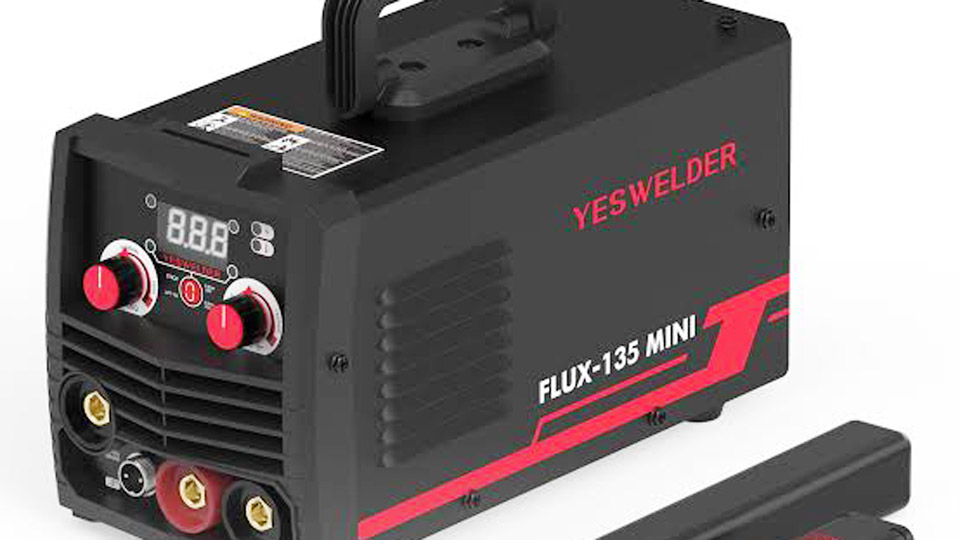
Image by manuals.plus
Why Flux Core on the YesWelder Flux 135 Matters in Real Jobs
Flux core arc welding (FCAW) uses a tubular wire filled with flux that creates its own shielding gas as it burns. This protects the weld pool from contaminants even in windy conditions—perfect for field repairs or home shops without gas bottles.
On the YesWelder Flux 135, you get synergic controls that link wire speed to voltage, making it forgiving for beginners while still offering fine-tuning for experienced hands. I’ve used it on everything from 16-gauge sheet to 1/4″ plate for brackets and repairs.
Done right, it delivers solid penetration with minimal distortion on thinner material. Mess it up with wrong settings or dirty metal, and you’ll deal with porosity, slag inclusions, or burn-through.
Safety first, always. This machine outputs up to 135 amps, so wear proper PPE: auto-darkening helmet (shade 10-13), leather gloves, jacket, and boots. Work in a well-ventilated area—flux core produces more fumes than gas MIG. Keep a fire extinguisher handy; that flux leaves hot slag that can spark fires.
Getting Started: Unboxing and Initial Setup
Pull the Flux 135 out of the box, and you’ll find the welder, MIG gun, ground clamp, electrode holder for stick mode, and a small spool of .030″ or .035″ flux core wire. It’s lightweight—around 11 pounds—so you can move it around the shop easily.
Plug it into a dedicated 110V/20A circuit. These machines draw significant power at higher settings, so avoid extension cords unless they’re heavy-duty 12-gauge or better. Overheating or tripped breakers kill productivity.
Open the side door to load the wire spool. Remove the spool tensioner, seat the 2 lb spool, and feed the wire through the drive roller. For flux core, use the correct groove—usually knurled for these wires. Set the drive roll tension snug but not crushing the wire. Too tight and it bird-nests; too loose and it slips.
Install the proper contact tip (.030″ or .035″ matching your wire) and nozzle. For initial feeding, many remove the tip temporarily to avoid jams. Use the inching button on the machine to feed wire smoothly without pulling the trigger. This is a game-changer for setup.
Polarity matters hugely. For flux core on this machine, connect the gun to the negative terminal (DCEN—electrode negative). Check your door chart or manual; reversing it can cause unstable arcs and poor performance.
Understanding the Controls on the YesWelder Flux 135
The Flux 135 keeps things straightforward with digital display and a few knobs. Mode selector lets you switch between Flux (MIG), Stick, and Lift TIG (optional torch needed).
For flux core:
- Wire Diameter Selector: .030″ or .035″. Smaller wire for thinner material and better control; larger for thicker stuff and higher deposition.
- Wire Feed Speed (WFS): Primary control. Higher speed means more amperage and hotter weld.
- Voltage Fine-Tune: Synergic mode handles most of it, but adjust ± a few volts for your technique and metal.
The machine has a built-in parameter chart inside the door. Use it as a starting point—it’s calibrated for common thicknesses.
I’ve found the synergic settings get you 80% there. The rest comes from listening to the arc and watching the puddle.
Step-by-Step: How to Weld with YesWelder Flux 135 Flux Core
- Material Prep — Clean is king. Grind or wire-brush mill scale, rust, paint, and oil off the joint. Flux core tolerates some dirt better than solid wire, but dirty metal still causes porosity. Bevel thick plates for better penetration.
- Joint Setup — Use clamps or magnets to hold pieces. For butt joints on thicker material, leave a small gap. T-joints and lap joints are forgiving starters.
- Settings Selection — Match wire size and thickness to the chart. Example starting points (adjust based on your test beads):
- 1/8″ mild steel, .030″ wire: Around 180-250 IPM WFS, voltage in the mid-range.
- 1/4″ plate, .035″ wire: Higher WFS (250-350+ IPM), hotter settings. Test on scrap. Listen for a steady “bacon frying” sound—not popping or hissing.
- Technique — Drag the gun at 10-15° angle, pulling the nozzle away from the direction of travel (drag technique only for flux core). Maintain 5/8″ to 3/4″ stick-out—longer than gas MIG. Too short and you get spatter and burn-back; too long and the arc gets unstable. Travel speed: Move just fast enough to stay ahead of the puddle without leaving slag behind or losing penetration. On verticals, go upward for better control.
- Arc Control — Keep the gun perpendicular to the work for even beads. Weave slightly on wider joints if needed, but straight stringer beads work best for most repairs.
Run a few test beads. If the bead is convex and ropey with lots of spatter, increase voltage or slow down. If it’s concave or has undercut, dial back heat or speed up.
Amperage and Settings Guidance for Common Materials
The Flux 135’s 20-135A range covers most hobby and light fab work. Here’s shop-tested guidance:
For .030″ Wire (great for thinner stuff up to 3/16″):
- Thin sheet (16-18 ga): Lower WFS, around 150-200 IPM.
- 1/8″ plate: 200-280 IPM, moderate voltage.
- Watch for burn-through on thin metal—use short bursts or backstep.
For .035″ Wire (better deposition on thicker material):
- 1/4″ steel: Push toward higher settings, 250-350 IPM.
- Multi-pass on 3/8″: Build layers with good interpass cleaning.
Always run on scrap of the same thickness and condition. Factors like ambient temperature, wind, and electrode brand affect results. Some cheaper wires feed poorly or produce more slag.
Comparison Table: .030″ vs .035″ on YesWelder Flux 135
| Material Thickness | Recommended Wire | Typical WFS Range | Notes |
|---|---|---|---|
| Up to 1/8″ | .030″ | 150-280 IPM | Better control, less heat input |
| 3/16″ – 1/4″ | .035″ | 220-350 IPM | Higher deposition, good penetration |
| Multi-pass thicker | Either | Adjust per pass | Clean slag between passes |
Adjust voltage fine-tune for puddle fluidity. Hotter settings help on dirty or thicker metal.
Common Mistakes and How to Avoid Them
Beginners often set wire speed too high, causing the wire to stub into the puddle or create a ropey bead. Pros sometimes ignore prep and blame the machine when porosity appears.
Other pitfalls:
- Short stick-out: Leads to burn-back into the tip and excessive spatter.
- Wrong polarity: Unstable arc and poor welds.
- Pushing instead of dragging: Traps slag and weakens the joint.
- No interpass cleaning: Slag inclusions ruin multi-pass strength.
- Overheating thin metal: Warping and burn-through. Use lower settings or pulse technique if available.
Test frequently. A good bead should be flat to slightly convex, with easy-to-remove slag and no undercut.
Joint Preparation and Material Compatibility
For best results on mild steel, focus on fit-up. Gap joints appropriately—too tight and penetration suffers. On repairs, grind cracks out in a V or U shape before welding.
The Flux 135 works well on carbon steel and some stainless. Avoid aluminum (needs different process and usually gas). For galvanized material, grind the coating off first to avoid toxic fumes and porosity.
In fabrication, I prep edges with a grinder for bevels on anything over 1/4″. This allows full penetration without excessive heat.
Expanding Capabilities: Stick and Lift TIG Modes
The Flux 135 isn’t just flux core. Switch to Stick mode for outdoor work or when you need deeper penetration. Use 6013 or 7018 rods (3/32″ or 1/8″). Adjust hot start and arc force on the panel for easier starts and stable arcs.
Lift TIG (with optional torch) gives clean welds on thinner material or when appearance counts. It’s not high-frequency start, so touch and lift—great for precision but requires practice.
Many users buy this for flux core but end up using all three processes, making it versatile for a small shop.
Troubleshooting Common Issues
- Wire feeding problems: Check tension, drive rolls, and liner. Clean or replace contact tip often.
- Excessive spatter: Increase voltage, shorten stick-out slightly, or check polarity.
- Porosity: Clean metal better, reduce wind, or increase stick-out.
- Weak arc: Higher settings or fresh wire. Ensure good ground connection.
- Overheating machine: Respect duty cycle—especially at higher amps on 110V. Let it cool.
Keep the machine clean. Flux residue is corrosive over time.
Safety and Shop Best Practices
Beyond PPE, secure your workpiece. Use proper ventilation or an exhaust fan—flux fumes contain manganese and other nasties. Inspect cables regularly for damage.
For students or new welders, practice beads on plate before joints. Build muscle memory for consistent travel speed and angle.
Real-World Projects and Applications
I’ve seen these machines used for trailer hitches, gate repairs, custom brackets, and auto body fab. On a recent farm repair, it handled 1/4″ angle iron for a loader bracket with solid multi-pass beads—no distortion issues after proper tacking.
For hobbyists building furniture or art, the portability and gasless operation let you work anywhere. Pros appreciate the quick setup for small jobs where hauling a big MIG isn’t worth it.
Taking Your Skills Further
Practice is everything. Run beads in all positions: flat, horizontal, vertical, overhead. Vertical-up works well with flux core once you dial travel speed.
Experiment with weave patterns on wider joints. Learn to read the puddle—bright, fluid means good heat; dull or frozen means too cold.
Wrapping Up the Essentials
After running dozens of projects with the YesWelder Flux 135, the biggest takeaway is that fundamentals beat fancy features every time. Master clean prep, correct polarity and stick-out, drag technique, and test settings on scrap. Understand your material thickness, choose the right wire diameter, and fine-tune based on sound and bead appearance.
You’re now equipped with practical knowledge on settings, techniques, common pitfalls, and multi-process use that translates directly to stronger welds and fewer headaches in the shop. The machine is capable—your technique makes the difference.
Always keep a few spare contact tips and a wire brush in your kit. When the arc starts acting up mid-job, nine times out of ten it’s a clogged tip or slag buildup. Swap it quick and keep moving—downtime kills momentum.
FAQ: Real Questions from Welders
What are the best starting settings for 1/8″ steel with .030″ flux core on the YesWelder Flux 135?
Start with the door chart—typically mid-range wire speed. Run a test bead and adjust WFS up for more penetration or voltage for smoother puddle. Aim for that steady crackle sound. Drag at 5/8-3/4″ stick-out.
How do I reduce spatter when using the Flux 135?
Increase voltage slightly, maintain proper stick-out, ensure clean metal, and use quality wire. Avoid pushing the gun. Short bursts on thin material also help.
Can the YesWelder Flux 135 weld thick material like 1/4″ or more?
Yes, with .035″ wire and multi-pass technique. Build layers, cleaning slag between passes. Don’t expect single-pass miracles on max thickness—focus on good fusion.
Why is my wire feeding poorly or bird-nesting?
Check drive roll tension, alignment, and contact tip size. Use the inching function to diagnose. Dirty or kinked liner is a common culprit—clean or replace it.
Is the Flux 135 good for beginners?
Absolutely. The synergic controls and lightweight design make it approachable, while the multi-process capability grows with you. Practice consistently and you’ll progress fast.


