
You can run a decent weld, but if your measurements are off even a fraction, the whole job can fall apart during fit-up. I’ve had pieces that looked perfect on the bench refuse to line up because I rushed the measuring step. That’s exactly why learning how to read calipers and micrometers is a skill every welder needs—not just machinists.
In real workshop conditions, accurate measurements mean tighter joints, better penetration, and less grinding or rework later.
Calipers give you quick, reliable readings, while micrometers step in when you need that extra level of precision. But if you’re not reading them correctly, you’re basically guessing—and that guess shows up in your final weld.
This matters more than most beginners realize. Good measurement habits save material, time, and frustration on every project. In this guide, I’ll walk you through how to read both tools the right way, with simple steps you can apply immediately in your own work.
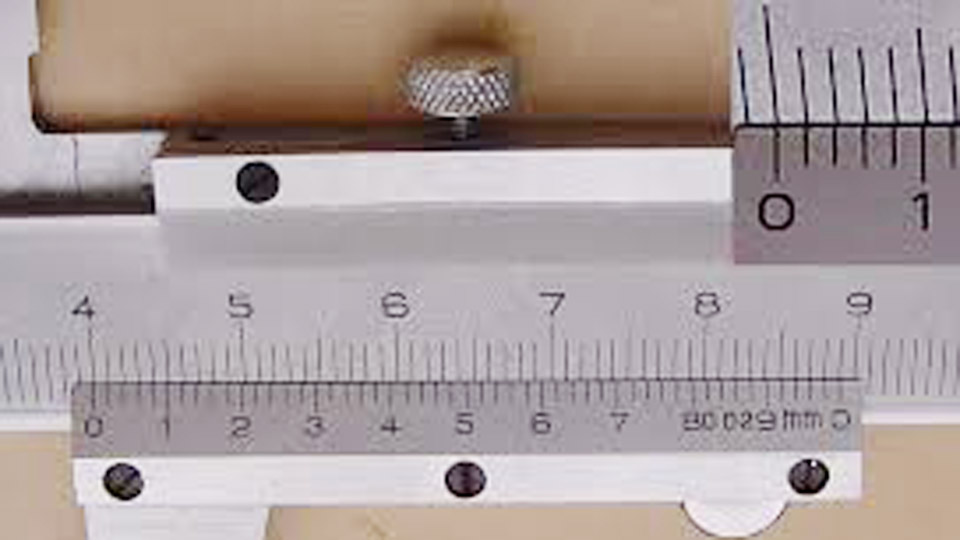
Image by science.uct.ac.za
Why Precise Measurement Tools Matter More Than You Think in Welding
Calipers and micrometers aren’t fancy extras—they’re daily essentials for joint preparation and fit-up. In welding, everything starts with knowing exact dimensions. Plate thickness determines bevel angle and land size.
Wire or rod diameter influences feed speed and amperage ranges. Root opening and misalignment tolerances often sit in the 1/16-inch or tighter range per AWS standards.
Without reliable readings, you guess on settings. Too loose a fit-up on a butt joint, and you chase the puddle with extra heat, increasing distortion. Too tight, and you get incomplete penetration.
I’ve run 7018 electrodes on structural steel where a 0.010-inch error in material thickness forced me to drop amperage from 140 to 110 just to avoid undercut—then grind and reweld anyway.
These tools help across processes. In SMAW, you verify electrode diameter (like 1/8-inch vs. 5/32-inch) for correct current ranges. In MIG, you check contact tip to work distance indirectly through consistent material prep. Even in TIG on stainless, precise caliper checks on filler rod diameter prevent feeding issues that cause porosity.
Common shop reality: dust, sparks, and drops happen. Tools that survive a welding environment while delivering repeatable accuracy keep you productive. They also build confidence when qualifying procedures or working to print tolerances on fabrication jobs.
Understanding the Main Types of Calipers Used in Welding Shops
What they are
Calipers measure outside dimensions, inside dimensions, depth, and steps. In welding, the most common are vernier, dial, and digital types, usually 6-inch or 12-inch models for plate, pipe, and small assemblies.
How they work
The jaws slide along a beam with a main scale. Vernier adds a sliding scale for finer resolution. Dial uses a geared mechanism and needle. Digital employs electronics for instant readout, often with inch/metric conversion and zeroing.
When and why to use them
Grab calipers for quick checks during fit-up—measuring stock thickness before cutting, verifying gap with feeler gauges combined, or checking bevel depth. They’re faster than micrometers for broader ranges and versatile for irregular shapes like weld coupons or repair patches.
Practical tips from the shop floor
Always wipe the jaws clean before use—slag or scale throws readings off fast. Zero the tool each time, especially digital or dial models. For outside measurements on plate, use the flat jaw faces and apply light, consistent pressure. Tilted jaws create Abbe error, where the reading skews because the scale isn’t in line with the contact points.
In practice, I use calipers to measure material thickness on mild steel for amperage selection. For 1/8-inch plate, I confirm exact size before setting my machine around 90-110 amps with 1/8-inch 6010 or 7018 rods. On pipe, inside jaws help check ID after beveling.
Common mistakes beginners and pros make
Reading the wrong scale edge on vernier—always use the zero line on the vernier scale against the main scale. Forgetting to zero after a drop or temperature change. Applying too much force, which flexes cheaper frames. On inside measurements, rocking the tool instead of finding the true diameter.
I’ve watched experienced welders misread a vernier by 0.020 inches because parallax made lines look aligned from the wrong angle. Always view perpendicular to the scale.
Step-by-Step: How to Read Vernier Calipers Accurately
Vernier calipers are shop workhorses because they need no batteries and hold up in dirty environments.
- Close the jaws fully and check zero alignment. If off, note the error and subtract or add later.
- Open the jaws and place the object snugly between them for outside measurements. Use inside jaws for holes or slots.
- Read the main scale first: Find the line on the main scale immediately left of the vernier zero mark. This gives you the whole and tenth-of-an-inch or millimeter portion.
- Look for the vernier line that best aligns with any main scale line. Each vernier division usually equals 0.001 inches or 0.02 mm depending on the tool.
- Add the two readings. Example in inches: Main scale shows 1.2, vernier aligns at 0.034 → total 1.234 inches.
For metric vernier: Main scale might read 12 mm, vernier adds 0.48 mm for 12.48 mm total.
Real-world welding example: Measuring a 3/16-inch plate for a fillet weld. You confirm 0.1875 inches exactly, then set joint prep accordingly to avoid excessive heat input that causes distortion on thinner stock.
Practice with scrap pieces. Take three readings from different angles and average them for reliability on imperfect surfaces.
Dial and Digital Calipers: When Speed Beats Traditional Reading
Dial calipers shine for quick shop reads. The needle points to hundredths while the beam gives tenths and inches. No adding scales—just glance and note.
Digital versions eliminate interpretation entirely. Press zero, measure, read the display. Many switch between inches and millimeters instantly—handy when switching from US prints to metric stock.
Pros and cons comparison:
Vernier: Pros—durable, no power needed, inexpensive. Cons—slower to read accurately, requires good eyesight and lighting.
Dial: Pros—easier readout than vernier, no batteries. Cons—sensitive to drops that knock gears out of alignment, magnetic fields can interfere in some shops.
Digital: Pros—fastest, clearest, often with data output or hold function. Cons—batteries die at the worst time, sensitive to dust/oil/sparks common around welders, higher cost.
In my experience, digital works great for clean bench work or students, but I keep a good dial or vernier in the toolbox for the floor where grime builds up fast. Always carry spare batteries if you go digital.
Practical tip: For depth measurements on grooves or counterbores in weld prep, extend the depth rod carefully and read without tilting.
Why Micrometers Deliver Higher Precision Than Calipers
What they are
Micrometers (often called “mics”) measure with 0.001-inch or better resolution, far tighter than most calipers. Outside mics are most common in welding for checking material thickness, wire diameters, or small machined features.
How they work
A precision screw thread advances the spindle toward the anvil. One revolution of the thimble typically equals 0.025 inches or 0.5 mm. The sleeve shows larger increments, thimble shows thousandths, and some have a vernier for ten-thousandths.
When and why to use them
Use mics when tolerances matter—verifying thin sheet for TIG, checking filler rod diameter for consistent feeding, or confirming machined edges before welding. Calipers suffice for general fit-up, but mics catch the small errors that affect weld quality on critical jobs like pressure vessels or aerospace repairs.
Micrometers reduce operator error on repetitive measurements because the ratchet or friction thimble applies consistent pressure.
Step-by-Step: How to Read an Inch Outside Micrometer
Standard 0-1 inch micrometer is the go-to.
- Clean the anvil and spindle faces.
- Place the part between them. Use the ratchet stop for consistent feel—three clicks usually gives proper pressure without crushing.
- Read the sleeve (barrel) first: Largest visible number is tenths (0.100, 0.200, etc.). Count additional 0.025 lines exposed.
- Read the thimble: The line aligning with the sleeve’s longitudinal mark gives thousandths (0.001 each).
- If equipped with vernier, add the ten-thousandths where a vernier line aligns with a thimble line.
- Add everything: Sleeve + lines + thimble + vernier.
Example: Sleeve shows 0.200 + two 0.025 lines (0.050) = 0.250. Thimble at 13 = 0.013. Vernier at 2 = 0.0002. Total: 0.2632 inches.
Metric micrometer reading: Similar but sleeve often in 0.5 mm increments, thimble in 0.01 mm.
Welding application: Checking 0.035-inch MIG wire diameter ensures your machine feeds correctly at recommended settings. Or measuring base metal at 0.125 inches before running 1/16-inch 4043 filler on aluminum to dial in exact heat.
Common Mistakes When Reading Micrometers (and How to Avoid Them)
Beginners often overtighten, deforming the frame or part slightly. Pros sometimes misread by a full 0.025-inch revolution because they lose count on the sleeve.
Other pitfalls:
- Not zeroing: Close the mic and check that zero on thimble lines up with sleeve zero.
- Parallax: View straight on, not at an angle.
- Temperature effects: Hot parts from cutting expand—let them cool or account for it.
- Using the wrong size mic: Don’t force a 0-1 inch on a 1.5-inch part; get the right range.
- Ignoring ratchet: Finger-tightening varies pressure wildly between users.
In the shop, I always take multiple readings rotating the part slightly. On pipe wall thickness, average several spots because mill tolerances vary.
Pro tip for welders: When measuring after flame cutting or plasma, remove scale first— it adds false thickness.
Digital Micrometers and When to Choose Them
Digital mics give instant readout to 0.00005 inches in some models, with zero set and hold functions. Great for teaching or high-volume inspection.
Pros: No interpretation errors, easy data logging in some advanced units.
Cons: Cost, battery dependency, vulnerability to shop environment (spatter, magnetic fields from welders).
Many pros stick with analog for reliability in harsh conditions but use digital for final verification.
Calipers vs. Micrometers: Quick Comparison for Welders
| Aspect | Calipers | Micrometers |
|---|---|---|
| Resolution | Typically 0.001″ or 0.02 mm | 0.0001″ or better |
| Range | Wide (6-24+ inches) | Narrow (usually 1″ per tool) |
| Best For | Fit-up, general dimensions | Precision thickness, diameters |
| Speed | Faster for quick checks | Slower but more repeatable |
| Durability in Shop | Good, but frames can flex | Excellent if handled properly |
| Cost | Lower entry price | Higher for quality sets |
Choose based on the job. For most daily welding prep, a good 6-inch digital or dial caliper covers 80% of needs. Break out the mic for anything requiring tighter control.
Real-World Applications in SMAW, MIG, and TIG Welding
In SMAW with 7018 rods on structural steel, I measure plate thickness to select amperage—say 110-150 amps for 1/8-inch rod on 1/4-inch material. Wrong thickness reading means adjusting on the fly, risking slag inclusions.
For MIG on thin auto body panels, calipers confirm sheet gauge so you avoid burn-through with short-circuit transfer at lower volts. Micrometers verify wire diameter for proper WFS (wire feed speed) settings on US machines.
In TIG, precise rod diameter measurement prevents feeding too much or too little filler, which controls the puddle and reduces porosity on stainless or aluminum.
Joint prep examples: Use calipers to check bevel depth and root face (land) on a single-V groove. Typical for 1/2-inch plate might be 30-35° bevel each side with 1/16-inch land. Measure multiple points along the joint because hand grinding varies.
On pipe welding, measure wall thickness variations around the circumference—critical for setting travel speed and avoiding lack of fusion.
Safety Considerations When Using Measuring Tools Around Welding
Never measure hot metal right after welding or cutting—thermal expansion skews readings, and you risk burns. Keep tools away from live arcs; magnetic fields can damage digital electronics.
Clean tools regularly to remove spatter. Store in a dry box to prevent rust on precision surfaces.
Wear proper PPE, but also protect your eyes—good lighting helps accurate scale reading without strain.
Maintaining Your Calipers and Micrometers for Long Shop Life
Wipe down after every use. Lightly oil the beam or threads occasionally, but never the measuring faces. Store in cases, not loose in toolboxes where drops happen.
Calibrate periodically against gage blocks or known standards, especially if dropped. Digital units may need battery changes and occasional zero resets.
In dusty fabrication shops, vernier and dial often outlast digital because fewer failure points.
Building Measurement Skills Through Practice
Start with scrap metal of known sizes from suppliers. Measure the same piece with calipers then mic and compare. Practice reading under shop lighting conditions.
Take before-and-after measurements on test coupons—cut, bevel, then check dimensions. This reveals how your prep affects final fit-up.
Over time, you’ll develop “feel” for proper pressure and spot inconsistencies faster.
Start with these fundamentals, and you’ll handle measurements confidently on any job, from hobby projects in the garage to professional fabrication.
Final Thoughts
Consistent, accurate readings with calipers and micrometers turn good welders into reliable ones. You control variables like material thickness, gap, and diameters that dictate amperage ranges, joint prep, and filler compatibility. Beginners often chase problems in the weld pool that started with sloppy measurement. Pros prevent most issues at the prep stage.
One strong pro-level tip I’d give any welder: Always measure twice in different orientations, especially on flame-cut edges or warped stock, and average the results.
That simple habit has saved me countless hours of rework on everything from mild steel frames to stainless repairs. It builds the discipline that shows in cleaner, stronger welds every time.
FAQs
How do I know if my calipers or micrometers need calibration?
If readings vary more than 0.001-0.002 inches on the same clean test piece, or if zero doesn’t align perfectly when closed, it’s time to check against known standards or send for professional calibration. Drops or heavy shop use accelerate this.
Can I use regular calipers for precise weld gap measurements?
Yes for most shop tolerances, but combine with feeler gauges for tighter gaps under 0.020 inches. For critical root openings on pipe, a dedicated weld gap gauge or micrometer gives better confidence before striking an arc.
What’s the difference in reading metric versus inch tools in US welding shops?
US prints often use inches, but imported material or machines may be metric. Practice both—digital tools switch easily. Remember: 1 inch = 25.4 mm exactly for conversions during mixed jobs.
Why do my micrometer readings change slightly each time I measure the same spot?
Usually inconsistent pressure, dirt on faces, or part temperature. Use the ratchet consistently, clean surfaces, and let hot metal cool. Multiple averaged readings help.
Are digital tools worth it for a hobby welder starting out?
They speed up learning with clear readouts, but invest in a solid analog set too for durability. Many hobbyists do fine with affordable 6-inch digital calipers for most tasks, adding a basic 0-1 inch mic for precision work.


