
If your Hobart welder’s wire feed is acting up, it can derail a weekend project fast—but the fix is usually straightforward with the right maintenance and adjustments. Much like tackling stubborn stain removal in the bathroom or following reliable cleaning tips to keep tools and surfaces spotless, resolving wire slipping, tangling, or inconsistent feed often comes down to cleaning, tension tweaks, and routine inspection.
This short guide explains the most common Hobart welder wire feed problems, why they occur, and practical, step-by-step solutions that save time and extend equipment life. Treating your welder with the same care you give when disinfecting and maintaining your home leads to smoother operation and fewer surprises on the job.
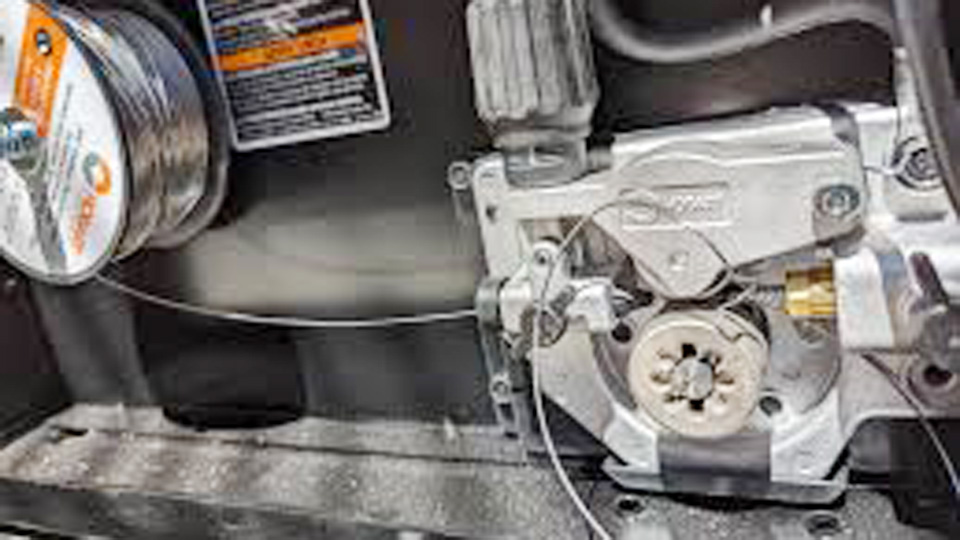
Image by reddit
Why Wire Feed Problems Matter
Wire feed issues aren’t just annoying—they can compromise weld integrity. A stuttering wire leads to inconsistent welds, porosity, or weak joints that might fail under load. For pros, this could mean failing an inspection or redoing work, costing time and money.
For DIYers and hobbyists, it’s wasted wire and frustration. Students, you’ll want to nail this to build confidence and pass your practicals. And in industries like fabrication or automotive repair, reliable welds are non-negotiable for safety and durability. Let’s break down the common culprits and how to tackle them.
Common Hobart Welder Wire Feed Problems
Hobart welders, like the Handler 140 or IronMan 230, are solid machines, but wire feed problems can crop up with any MIG setup. Here’s what you’re likely dealing with:
- Birdnesting: Wire tangles at the drive rollers, creating a mess.
- Burn-Back: Wire melts back into the contact tip, jamming the gun.
- Erratic Feeding: Wire stutters or stops, causing inconsistent welds.
- No Feed at All: Trigger pulls, but no wire comes out.
- Wire Slipping: Drive rollers spin, but the wire doesn’t move.
Each of these has specific causes, from tension issues to worn parts. Let’s troubleshoot them one by one.
Checking Wire Feed Tension
The drive roller tension is the first thing I check when wire feed acts up. Too much tension crushes the wire, causing birdnesting or slipping. Too little, and the wire doesn’t feed consistently. Here’s how to get it right:
- Release Tension: Loosen the tension knob on your Hobart’s drive system.
- Feed Wire: Manually push the wire through the gun to ensure it’s not kinked.
- Adjust Tension: Tighten the knob until the wire feeds smoothly without slipping. You should feel slight resistance but not strain.
- Test Weld: Run a bead on scrap metal. If the wire stutters, reduce tension slightly; if it slips, increase it.
My Experience: I once cranked the tension too high on my Handler 140, thinking it’d solve erratic feeding. Instead, I got a birdnest that took 20 minutes to untangle. Now, I adjust in small increments and test on scrap first.
Pro Tip: Check tension every time you change wire spools. Different wire sizes (e.g., 0.030” vs. 0.035”) need slight tweaks.
Inspecting the Drive Rollers
Worn or mismatched drive rollers are a common cause of wire feed issues. Hobart welders typically use V-groove rollers for solid wire, U-groove for aluminum, and knurled rollers for flux-cored wire. If the grooves are worn or the wrong type is installed, the wire won’t feed properly.
- Check Groove Condition: Look for wear, flattening, or debris in the grooves. Clean with a wire brush or replace if worn.
- Match Wire Type: For example, use a V-groove for 0.030” solid wire on steel or a U-groove for 0.035” aluminum wire.
- Ensure Alignment: Rollers should grip the wire evenly. Misaligned rollers cause slipping or birdnesting.
Common Mistake: Using a knurled roller for solid wire. I did this once, and it chewed up the wire, causing constant jams. Always double-check your roller type.
Fix: Replace worn rollers (Hobart sells replacements for models like the Handler series). Keep spares in your shop to avoid downtime.
Cleaning or Replacing the Contact Tip
A worn or clogged contact tip is a frequent culprit for burn-back and erratic feeding. The tip transfers current to the wire, so any damage or buildup disrupts the arc.
- Inspect the Tip: Look for burn marks, an enlarged hole, or wire residue. A healthy tip should have a clean, tight bore.
- Clean It: Use a tip cleaner or wire brush to remove spatter. If the hole is too large, replace it.
- Match Tip Size: Use a 0.030” tip for 0.030” wire, 0.035” for 0.035”, etc. Hobart’s manual lists compatible sizes.
My Story: I ignored a worn tip on a job, thinking it’d hold up. Mid-weld, the wire fused to the tip, ruining a $50 gun. Now, I check tips before every major project.
Safety Note: Always unplug the welder before swapping tips to avoid shocks.
Examining the Welding Gun and Liner
The gun and liner guide the wire from the spool to the arc. A kinked, dirty, or worn liner can stop the wire dead in its tracks.
- Check for Kinks: Run your hand along the gun cable. Straighten any bends or replace the cable if damaged.
- Clean the Liner: Blow compressed air through the liner to clear dust or debris. Use a liner cleaning tool for stubborn clogs.
- Replace if Needed: Liners wear out, especially with aluminum wire. Hobart liners are model-specific, so check your manual.
Mistake to Avoid: Ignoring a dirty liner. I once spent an hour troubleshooting erratic feeding, only to find the liner was clogged with dust from my shop. A quick blast of air fixed it.
Tip: Keep the gun cable as straight as possible during welding to minimize friction.
Wire Spool and Hub Issues
A poorly installed or tangled spool can cause feeding problems. Here’s how to check:
Spool Tension: The spool should spin freely but not uncoil on its own. Adjust the hub’s tension nut (usually on the spool holder) until it feels right.
Check for Tangles: Inspect the spool for loops or overlaps. If tangled, replace the spool—trying to untangle it often makes things worse.
Wire Quality: Cheap wire can be inconsistent or rusty, causing feed issues. Stick to reputable brands like Hobart or Lincoln Electric.
Early in my welding days, I bought bargain-bin wire to save a few bucks. It fed so poorly I wasted hours troubleshooting. Now, I only use quality wire—it’s worth the extra cost.
Voltage and Wire Speed Settings
Incorrect voltage or wire feed speed (WFS) can mimic wire feed problems. Too high voltage causes burn-back; too low leads to stuttering. Here’s a basic settings chart for Hobart welders like the Handler 140 or 190:
| Material | Thickness (in) | Voltage (V) | Wire Speed (IPM) | Wire Size (in) | Gas Flow (CFH) |
|---|---|---|---|---|---|
| Mild Steel | 1/8 | 17–19 | 120–150 | 0.030 | 15–20 |
| Mild Steel | 1/4 | 20–22 | 180–220 | 0.035 | 20–25 |
| Stainless Steel | 1/8 | 16–18 | 100–130 | 0.030 | 15–20 |
| Aluminum | 1/8 | 19–21 | 150–180 | 0.035 | 20–25 |
How to Adjust:
- Set voltage based on material thickness (check your welder’s door chart).
- Adjust WFS until the arc sounds like steady bacon sizzling—not popping or hissing.
- Fine-tune on scrap metal to get a smooth bead.
If your Hobart has a digital display (like the IronMan 230), use it to monitor WFS precisely. For older models, mark your settings with a Sharpie for quick reference.
Gas Flow and Shielding Issues
MIG welding relies on shielding gas (usually 75/25 argon/CO2 for steel) to protect the weld pool. Incorrect gas flow can cause erratic wire feeding or poor weld quality.
- Check Flow Rate: Set to 15–25 CFH, depending on your environment. Increase slightly for outdoor welding to counter drafts.
- Inspect Hoses: Look for leaks or cracks in the gas line. A soapy water test can reveal bubbles at connections.
- Verify Gas Type: Use C25 (75/25) for steel, 100% argon for aluminum. Wrong gas causes arc instability.
Welding with an empty gas tank. I did this once, and the weld was porous and brittle. Always check your regulator gauge before starting.
Ensure good ventilation to avoid inhaling shielding gas or weld fumes, especially with stainless steel.
Step-by-Step Troubleshooting Guide
Here’s my go-to process for diagnosing wire feed problems on a Hobart welder:
- Check Tension: Adjust drive roller tension to grip the wire without crushing it.
- Inspect Rollers: Ensure they’re clean, matched to the wire type, and aligned.
- Examine Contact Tip: Clean or replace if worn or clogged.
- Clean Liner: Blow out debris or replace if damaged.
- Verify Spool: Ensure it’s not tangled and hub tension is correct.
- Adjust Settings: Set voltage and WFS based on material and thickness.
- Test Gas Flow: Confirm 15–25 CFH and no leaks.
- Run a Test Weld: Weld on scrap to confirm smooth feeding and arc stability.
Keep a checklist in your shop. It saves time when you’re in the heat of a project.
Common MIG Welding Mistakes and Fixes
Here are mistakes I’ve made and how to fix them:
- Birdnesting: Caused by excessive tension or a tangled spool. Reduce tension and check the spool for loops.
- Burn-Back: From high voltage or a worn tip. Lower voltage by 1–2V and replace the tip.
- Erratic Arc: Often due to wrong WFS or dirty metal. Adjust WFS and clean the joint with a grinder or acetone.
- Porosity: From low gas flow or contamination. Increase gas to 20 CFH and clean the metal thoroughly.
- Wire Not Feeding: Check for a kinked liner or loose drive rollers. Straighten the gun cable and tighten rollers.
Safety Tips for MIG Welding
Welding is rewarding but demands respect. Protect yourself:
- Wear a Helmet: Use an auto-darkening helmet with shade 10–12 for MIG.
- Use Gloves and FR Clothing: Prevent burns and UV exposure.
- Ventilate: Weld fumes, especially from galvanized steel, can be toxic. Use a fan or respirator.
- Inspect Equipment: Check cables, gas lines, and grounds for wear or leaks.
- Ground Properly: Ensure the workpiece is grounded to avoid shocks.
I learned the importance of ventilation the hard way after welding galvanized steel without a respirator—headaches for hours. Now, I keep a fan running and wear proper PPE.
When to Call a Professional
Most wire feed problems are fixable in the shop, but some issues require expert help:
- Electrical Problems: If the welder’s motor or circuit board fails, contact a technician.
- Persistent Jams: If troubleshooting doesn’t resolve feeding issues, the drive system may need professional servicing.
- Warranty Repairs: For newer Hobart welders, check your warranty before DIY fixes to avoid voiding it.
Keep your welder’s manual handy. It lists model-specific parts and troubleshooting steps.
Conclusion: Weld Smoothly with Confidence
You’re now equipped to tackle Hobart welder wire feed problems like a seasoned pro. From adjusting tension to swapping contact tips, you’ve got the know-how to keep your MIG welder feeding smoothly and producing strong, clean welds.
Whether you’re a DIYer fixing a gate, a hobbyist crafting art, a pro meeting deadlines, or a student learning the trade, these fixes will save you time, material, and frustration. Get back to your shop, test these solutions, and weld with confidence.
Clean your welder’s drive system monthly to prevent issues. A quick wipe-down of rollers and liners can save you hours of troubleshooting.
FAQ
Why does my Hobart welder’s wire keep birdnesting?
Birdnesting happens from too much drive roller tension or a tangled spool. Loosen the tension knob until the wire feeds smoothly, and check the spool for loops. Clean or replace the liner if it’s kinked.
How do I fix burn-back in my Hobart MIG welder?
Burn-back is caused by high voltage, a worn contact tip, or the tip being too far from the workpiece. Lower voltage by 1–2V, replace the tip, and keep a 1/4–3/8” stick-out.
What wire speed should I use for mild steel?
For 1/8” mild steel, set wire speed to 120–150 IPM with 17–19V on a Hobart welder like the Handler 140. Adjust until the arc sounds like steady sizzling bacon.
Can I weld aluminum with my Hobart welder?
Yes, with a spool gun and 100% argon gas. Use a U-groove roller and 0.035” aluminum wire (e.g., ER4043). Set voltage to 19–21V and WFS to 150–180 IPM for 1/8” aluminum.
Why is my weld porous with my Hobart welder?
Porosity comes from low gas flow, leaks, or dirty metal. Set gas to 15–25 CFH, check for hose leaks, and clean the joint with a grinder or acetone before welding.


