
The heat was cranked, flux sizzling, and yet that stubborn layer of old solder refused to budge. I’d tried scraping and heating it, only to watch the joint darken and warp slightly.
Figuring out the best way to remove old solder from a joint isn’t just about making things look clean—it’s about preventing weak spots, avoiding costly rework, and keeping your project safe. A messy joint can mean leaks in plumbing, electrical issues, or a structural failure down the line.
I’ll walk you through practical techniques I’ve tested on tricky fittings and delicate electronics, showing exactly how to strip away old solder without damaging your workpiece. By the end, you’ll be able to tackle even the most stubborn joints with confidence.

Image by terrylove
Why Removing Old Solder Matters
When you need to replace a component, fix a broken connection, or improve a solder joint, removing old solder is often the first step. Leaving old solder in place can lead to cold joints, bridges, or unreliable connections. In electronics, even a small mistake can cause a device to fail.
Old solder can hide cracks, dirt, or corrosion. If you try to add new solder on top of old material, you may trap contaminants that reduce the joint’s quality. That’s why professionals always remove the old solder completely before making repairs.
Understanding Solder And Solder Joints
Solder is a metal alloy used to join components on a circuit board. Most solder is made from a mix of tin and lead, but modern electronics use lead-free solder for health and environmental reasons. Old solder joints may contain either type.
A solder joint is where the solder connects two pieces of metal—usually a component lead and a pad on a printed circuit board (PCB). Over time, solder joints can crack, corrode, or collect debris, making good removal techniques essential.
Choosing The Right Tools For Solder Removal
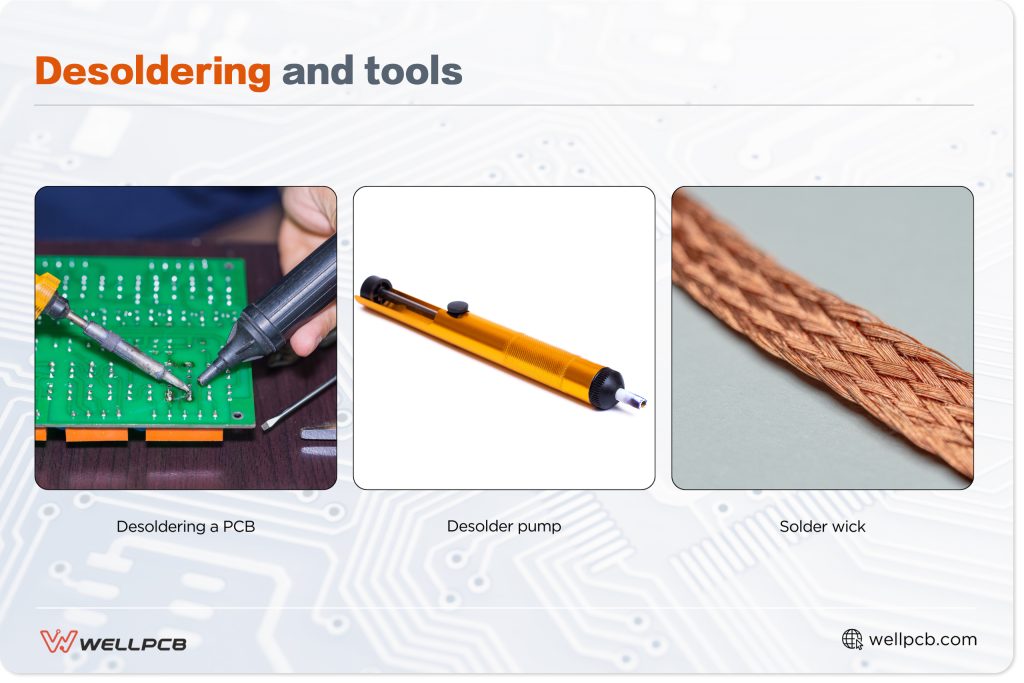
The tool you use to remove old solder will affect the outcome. Some tools are better for large joints, others for fine electronics work. Below is a comparison of common solder removal tools.
| Tool | Best For | Advantages | Disadvantages |
|---|---|---|---|
| Solder Wick | Small joints, PCBs | Precise, cheap | Needs practice, slow for large joints |
| Solder Sucker (Pump) | Through-hole, large blobs | Quick, reusable | Can miss some solder, awkward in tight spots |
| Desoldering Station | Frequent or professional work | Fast, clean, less risk of damage | Expensive, bulky |
| Hot Air Rework Station | SMD parts, complex boards | Even heating, works for many parts | Costly, learning curve |
The best tool depends on your joint type, workspace, and experience. Many hobbyists start with a solder wick and a solder sucker, then invest in a desoldering station as their skills grow.
The Step-by-step Process: Removing Old Solder Safely
There’s no single “best” way for every situation, but the safest, most reliable process usually includes these steps:
1. Prepare Your Workspace
Before you start, make sure your workspace is clean and well-lit. You’ll need:
- A soldering iron (temperature-controlled is best)
- Solder removal tool (wick, sucker, or station)
- Tweezers or small pliers
- Isopropyl alcohol (for cleaning)
- A small brush or lint-free cloth
Always wear eye protection and work in a ventilated area, especially with lead-based solder.
2. Heat The Joint Properly
Set your soldering iron to the right temperature: 350–400°C (660–750°F) for most lead-free solder, slightly lower for leaded solder. Too hot, and you’ll damage pads; too cool, and the solder won’t melt.
Touch the tip of the iron to the joint for 1–2 seconds. Don’t press too hard—let the heat do the work. If the solder doesn’t melt smoothly, check your iron’s temperature.
3. Use Solder Wick Or Desoldering Braid
Place the solder wick directly on the molten solder, then press the iron tip onto the braid. The wick will draw up the solder by capillary action. Move to a fresh part of the wick as it fills with solder.
It’s important not to leave the iron on the pad too long. Overheating can lift pads or damage the board.
4. Try A Solder Sucker For Larger Blobs
If there’s a lot of solder, heat the joint until the solder is liquid, then quickly place the solder sucker tip over the solder and press the button. The vacuum pulls the solder into the chamber.
You might need to repeat this step for stubborn joints. Always clean the tip of the solder sucker after use to maintain suction.
5. Clean The Area
Old flux and solder residue can cause trouble later. Use a small brush and isopropyl alcohol to clean the area. This removes flux, lets you inspect the joint, and ensures new solder will stick well.
6. Inspect And Repeat If Needed
Look at the joint under good light. If there’s still solder left, repeat the process. Be patient—rushing can damage components.
7. Remove The Component (if Needed)
Once the solder is gone, use tweezers to gently lift the component. If it won’t budge, check for hidden solder or bent leads.
Solder Wick Vs. Solder Sucker: Which Is Better?
Some beginners wonder if they should use a solder wick or a solder sucker. Both tools have strengths and weaknesses.
| Factor | Solder Wick | Solder Sucker |
|---|---|---|
| Best for | Small pads, SMD work | Through-hole, large blobs |
| Precision | High | Medium |
| Learning curve | Needs practice | Easy to use |
| Cost | Low | Low |
| Risk of damage | Low if careful | Medium (can jolt components) |
Solder wick is better for delicate or tight spaces, but can take longer. Solder suckers clear big blobs fast but are less precise. Many technicians use both, depending on the situation.
Advanced Techniques: Hot Air And Desoldering Stations
For dense circuit boards or surface-mount devices (SMD), simple tools may not be enough. Advanced methods offer more control:
Hot Air Rework Station
A hot air station blows heated air to melt solder on multiple pins at once. This is ideal for SMD chips or connectors with many legs. You set the temperature and airflow, then gently heat the area until the solder melts.
This tool reduces the risk of lifting pads, but it’s easy to overheat nearby parts. Practice on scrap boards first.
Desoldering Stations
A desoldering station combines a heated tip with a vacuum pump. You place the tip over the joint, melt the solder, then trigger the vacuum to suck the solder away. It’s fast, clean, and perfect for frequent repairs.
Desoldering stations are expensive but worth it for heavy users or professionals. They reduce the risk of damage and speed up big jobs.
Mistakes To Avoid When Removing Old Solder
Even experienced people make common mistakes. Here are two non-obvious issues that often cause trouble:
- Using the wrong temperature: Many beginners use too much heat, thinking it will remove solder faster. This can lift pads or crack traces. Always use the lowest temperature that melts the solder smoothly.
- Not cleaning after removal: Some skip cleaning, believing the flux will help new solder flow. Old flux can trap dirt and cause weak joints. Always clean with alcohol before resoldering.
Other mistakes include:
- Pulling components before all solder is removed (can damage pads)
- Using too much force with a solder sucker
- Reusing old, dirty solder wick (fresh braid works best)
- Forgetting to clean the soldering iron tip
How To Handle Stubborn Or Large Solder Joints
Sometimes, old solder is tough to remove—especially on large ground planes or old boards. Here’s what helps:
- Add fresh solder: It may sound strange, but adding a little new solder (with fresh flux) can help old solder melt and flow better. The flux cleans the joint and lowers the melting point.
- Use a larger tip: A bigger iron tip transfers heat better for large joints.
- Work in short bursts: If the joint won’t clear in one go, let it cool, then try again. This protects the board from heat damage.
Many old-school technicians rely on the “add new solder first” trick, which often surprises beginners.
What To Do If You Lift A Pad Or Trace
Pad or trace damage is a real risk, especially with old or cheap boards. If you notice a pad lifting, stop immediately. Do not pull or force the component.
- Let the area cool.
- Use a small amount of superglue or epoxy to secure the pad if possible.
- Use a thin wire to bridge to the next connection point if the pad is gone.
Sometimes, you’ll need to “repair” the trace by running a small insulated wire from the component leg to the next good pad. This is called a “trace jumper” and can save a board.
Tips For Removing Old Solder From Surface-mount Devices (smd)
SMD parts are small and easily damaged. Here’s the safest approach:
- Use tweezers to gently hold the component.
- Apply hot air or heat both ends with a fine soldering iron.
- Use a thin solder wick to remove solder from each pad.
- Clean with alcohol and inspect for lifted pads.
Patience is key—rushing SMD work leads to broken pads.
Cleaning After Solder Removal
Cleaning is not just about looks; it’s vital for future reliability. Isopropyl alcohol (at least 90%) is the best choice for removing flux and residue. Use a small brush, then wipe with a lint-free cloth.
This step also reveals any leftover solder or damage you might have missed. Always clean before resoldering.
When To Replace Vs. Remove Old Solder
In some cases, it’s better to replace the solder entirely, especially if the joint is dull, cracked, or corroded. Removing all old solder ensures the new joint will be strong and reliable.
If the solder is shiny and the joint is solid, you may only need to add a little fresh solder. But if you see green corrosion or flaky residue, full removal is best.
Safety Precautions For Solder Removal
Soldering and desoldering can be hazardous. Take these safety steps:
- Always wear eye protection (solder can spatter).
- Work in a well-ventilated area—solder fumes can be harmful.
- Wash your hands after handling lead-based solder.
- Keep hot tools away from flammable objects.
Lead-free solder is safer, but all fumes should be avoided.
Insider Tips For Cleaner Solder Removal
- Use flux before removing solder. Even if the joint looks clean, fresh flux helps solder flow and lifts old material.
- For multi-pin connectors, remove solder from all pins before trying to pull the part. This prevents bent pins or pad damage.
- Practice on old or scrap boards to build your skills before working on valuable electronics.
These small habits separate careful technicians from frustrated beginners.

Credit: www.reddit.com
How Professionals Remove Solder
Professional technicians use advanced tools for speed and safety. A typical pro setup includes:
- Temperature-controlled soldering stations
- Desoldering stations with built-in vacuum
- Hot air rework tools
- High-quality flux and cleaning supplies
Pros also use magnification and inspect every joint. They know that a rushed job can lead to expensive repairs later. Beginners often underestimate the value of cleanliness and patience.
Common Questions From Beginners
Many people have similar concerns when starting out. Here are a few examples:
- “Can I just reheat and pull off the component?”
It’s better to fully remove solder first; pulling risks pad damage.
- “Is lead-free solder harder to remove?”
Yes, it often melts at a higher temperature and needs more patience.
- “Can I use a hair dryer instead of a hot air station?”
No, hair dryers don’t get hot enough and lack control.
- “Is it OK to reuse old solder?”
No, old solder may have contaminants and doesn’t flow well.
- “How do I know if all solder is gone?”
Use good lighting and a magnifier; the pad should be shiny and flat, with no blobs.
Credit: www.wellpcb.com
When To Seek Professional Help
If you’re working on expensive or rare electronics and feel unsure, consider professional help. For vintage gear or compact mobile devices, mistakes can be costly. Some shops offer desoldering services using advanced tools.
Environmental Concerns And Solder Disposal
Old solder contains metals that shouldn’t go in regular trash. Collect old solder and dispose of it as electronic waste. Many cities offer recycling programs for e-waste. Never pour flux or solder down the drain—it can pollute water.
Wrapping Up
Removing old solder is a skill that improves with practice. With the right tools, careful technique, and attention to detail, you can avoid common mistakes and achieve clean, reliable results. Take your time, follow the steps above, and soon you’ll be removing old solder like a pro.
Frequently Asked Questions
What Is The Safest Way To Remove Old Solder From A Joint?
The safest way is to use a solder wick or desoldering station with the correct temperature. Apply fresh flux, heat the joint, use the tool to remove solder, and clean with isopropyl alcohol. Always avoid pulling or forcing components.
Can I Use Household Items To Remove Solder?
No, household items like knives or hair dryers are not safe. They don’t reach the right temperature and can damage your board or burn you. Use proper solder removal tools designed for electronics.
Why Does Adding New Solder Help Remove Old Solder?
Fresh solder contains active flux, which cleans the joint and makes the old solder melt more easily. This is especially helpful with oxidized or dirty joints. It’s a trick many professionals use.
How Do I Avoid Lifting Pads When Removing Solder?
Avoid using too much heat, don’t pry or pull components, and use the right tool for the joint size. Work slowly and let the board cool between attempts. If you sense a pad is lifting, stop and check before continuing.
What Should I Do With Old Solder Waste?
Collect old solder and debris in a metal container. Dispose of it as electronic waste according to your city’s rules. Don’t throw it in the trash or down the drain.


