
If you’re staring at your Miller Classic welding helmet wondering why the lens isn’t darkening like it should, or maybe that low battery indicator is flashing at you, don’t sweat it. I’ve been there more times than I can count in my years slinging rods and laying beads in shops across the Midwest.
I’m walking you through how to change the battery in your Miller Classic welding helmet step by step. It’s a simple fix that can save you from eye strain, messed-up welds, or worse—safety mishaps on the job. A dead battery in your auto-darkening helmet isn’t just annoying; it compromises your protection against those intense arc flashes, which can lead to serious issues like arc eye if you’re not careful.
Keeping your gear in top shape ensures weld integrity, lets you focus on technique without interruptions, and even saves money by extending the life of your equipment. Whether you’re a DIY fabricator tinkering in your garage, a student learning the ropes, or a pro like me handling heavy-duty projects, this guide’s got you covered.
I’ll share some real-world tips from my own experiences, common pitfalls to avoid, and even how this ties into broader welding practices. Grab a cup of coffee—or better yet, your helmet—and let’s get to it.
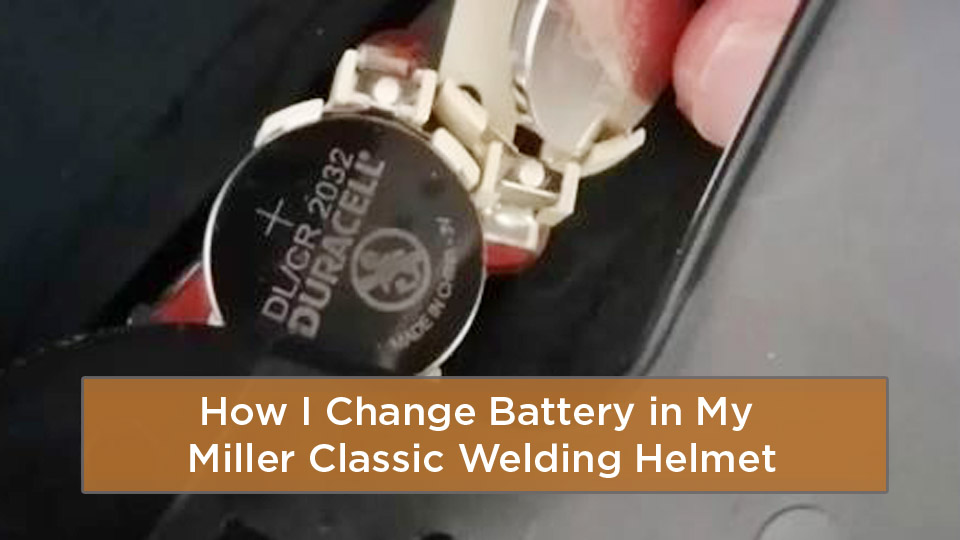
Image by weldingpros
Understanding Your Miller Classic Welding Helmet
Before we jump into swapping that battery, let’s talk about what makes the Miller Classic series such a reliable workhorse. I’ve used these helmets on everything from stick welding structural steel to MIG on automotive repairs, and they hold up well for the price point.
The Classic line includes models like the Variable Shade (VS), VSi, and Fixed Shade versions, each with auto-darkening tech that reacts lightning-fast to arcs— we’re talking 1/10,000 of a second or better.
Most Classics rely on batteries for the variable shade models, while some fixed shade ones are solar-powered with no user-replaceable battery. Why does this matter? Safety first— a properly powered lens provides constant UV and IR protection, even in the light state (shade 3), shielding your eyes from harmful rays that could cause long-term damage.
In my shop days, I saw guys skip maintenance, and it led to inconsistent shading, which throws off your weld puddle control and can weaken joints due to poor visibility.
Semantic stuff aside, think of your helmet as your first line of defense. It’s built to ANSI Z87.1 standards, meaning it’s tough enough for US job sites, but it needs regular care. Battery life affects sensitivity and delay settings, which are crucial for processes like TIG where low amps require precise control.
If you’re a hobbyist fabricating custom parts, or a student practicing on scrap, a fresh battery means fewer frustrations and better learning curves.
Early in my career, I was on a pipeline job where dust and heat killed batteries faster than usual. I learned the hard way that ignoring the low battery light led to a flickering lens mid-weld— not fun when you’re in position. Now, I check it weekly.
Signs Your Helmet Battery Needs Replacing
You don’t want to wait until your lens fails during a critical weld. I’ve had that happen, and it cost me time redoing a bead on a pressure vessel mock-up. Look for these telltale signs in your Miller Classic.
First, the low battery indicator—a red LED that lights up when you’ve got about 2-3 days left. It’s subtle, so test your lens regularly by pressing the reset button; it should darken twice and clear. If it doesn’t, battery’s likely the culprit.
Other clues? The lens stays light during arcs or flickers inconsistently. This could mimic sensitivity issues, but often it’s power-related. In low-light shops, you might notice delayed darkening, risking eye exposure. For pros on high-amp SMAW, this disrupts rhythm; for DIYers, it means pausing to flip up the helmet manually, which is inefficient and unsafe.
Why catch it early? A weak battery can lead to incomplete protection, affecting weld quality—like porosity from poor visibility—or even code violations on inspected work. Tip: If you’re in a humid environment, corrosion on contacts speeds up drain, so wipe them clean during checks.
Common mistake: Assuming it’s a lens problem and buying replacements unnecessarily. I’ve seen trainees do this, wasting bucks. Instead, start with the battery—it’s cheap and easy.
Choosing the Right Battery for Your Model
Not all Miller Classics use the same battery, and getting it wrong can void your warranty or cause malfunctions. From my experience, matching the spec is key for reliable performance.
For Variable Shade models, it’s two AAA alkaline batteries. Simple, available anywhere, and they last months with moderate use. The VSi model steps it up with a CR2450 lithium battery (Miller part 217043 or equivalent)—thicker, longer-lasting, great for frequent grind/weld switches.
Fixed Shade helmets? Solar-powered, so no swap needed; just charge in sunlight for 10-20 minutes if stored long-term. Pros of lithium: Better in extreme temps (-10°C to 55°C), which matters on outdoor jobs. Cons: Slightly pricier, but worth it for consistency.
Here’s a quick comparison table for clarity:
| Model Type | Battery Type | Lifespan Estimate | Pros | Cons |
|---|---|---|---|---|
| Variable Shade | 2x AAA Alkaline | 3-6 months | Cheap, easy to find | Shorter life in heavy use |
| VSi | CR2450 Lithium | 6-12 months | Longer lasting, temp resistant | Needs coin to access |
| Fixed Shade | Solar (non-replaceable) | Indefinite with charging | No batteries to buy | Requires light to charge |
Tip: Always observe polarity—positive up for CR2450. I once flipped it and wondered why the lens wouldn’t activate. Also, avoid rechargeables; they don’t provide steady voltage for auto-darkening.
For students or hobbyists, stock up on extras. On job sites, I keep a pack in my toolbox alongside filler rods and gloves.
Step-by-Step Guide to Changing the Battery
This is straightforward, no fancy tools needed beyond maybe a coin for VSi models. I’ve done this in the field with gloves on, so you can too. Always work in a clean area to avoid dust in the lens assembly.
First, identify your model—check the label inside or on the lens. Power off if possible, though most auto-off after 15-20 minutes.
For Variable Shade Models
- Locate the battery cover on the inside of the lens assembly—it’s marked LOCK/OPEN.
- Slide the cover to the left to open it.
- Remove the old AAA batteries, noting polarity.
- Insert two new AAA alkalines, matching the + and – symbols.
- Slide the cover back to lock.
Test by pressing reset—the lens should cycle dark twice. Done in under a minute.
For VSi Models
- Find the battery cover slot on the lens interior.
- Insert a coin (quarter works) and rotate counterclockwise to remove the cover.
- Pop out the old CR2450, positive side up.
- Place the new one in, positive facing up toward the helmet.
- Align the cover arrows at 6 and 12 o’clock, rotate clockwise 1/4 turn to secure.
Again, test with reset. If it doesn’t work, check contacts for dirt—wipe with a soft cloth.
For Fixed Shade Models
No battery change, but if unresponsive, expose to direct sunlight or bright artificial light for 20 seconds to charge the solar cell. I’ve used a shop light in a pinch.
Safety note: Never weld without testing. A failed darken could expose you to arcs, leading to burns or vision issues. In my early days, I skipped this and got a flash—lesson learned.
If you’re a fabrication hobbyist, do this before big projects. Pros, integrate into weekly gear checks.
Common mistake: Forcing the cover, which can crack it. Gentle does it. Fix? Order a replacement cover from Miller parts.
Tip: After changing, adjust sensitivity mid-range for most apps like MIG or Stick. For TIG, go higher to catch low arcs.
Common Mistakes and How to Fix Them
Even seasoned welders slip up. Here’s what I’ve seen and how to avoid it.
One biggie: Using the wrong battery type. AAA in a CR2450 slot won’t fit, and vice versa. Fix: Double-check your model manual or label. If damaged, contact Miller support.
Another: Ignoring polarity. It leads to no power. Fix: Flip it—positive always up for lithium.
Dirty contacts from shop grime drain batteries fast. I once had a helmet die weekly until I started cleaning with isopropyl on a swab. Tip: Do this monthly.
Over-tightening headgear after reassembly can misalign sensors. Loosen and readjust for comfort.
For students, mistaking battery issues for lens failure—test first. Hobbyists, don’t store helmets in cold; warm to room temp before use to avoid condensation.
Pros: In multi-process setups, low battery affects grind mode too, so check before switching tasks.
Troubleshooting After Battery Change
Battery swapped but still issues? Don’t panic—I’ve debugged plenty.
If lens won’t darken: Clean sensors and covers; spatter blocks them. Replace pitted covers immediately— they’re cheap packs of 5.
Flickering? Adjust sensitivity—start low, increase gradually in your lighting. Extreme light needs tweaks.
Stays dark? Reduce sensitivity or surrounding lights. For VSi, check X-Mode if on low-amp outdoor work.
If nothing works, lens assembly might need replacing, but that’s rare with proper care. In my experience, 90% of problems are battery or dirt-related.
Table of quick fixes:
| Issue | Likely Cause | Fix |
|---|---|---|
| No darkening | Dead battery | Replace and test reset |
| Flickering | Dirty sensors | Clean with soft cloth |
| Inconsistent shade | Low sensitivity | Adjust dial mid-high |
| Stays dark | High sensitivity | Dial down, reduce lights |
Safety tie-in: Always stop welding if unsure—better safe than sorry.
Maintaining Your Helmet for Longevity
Battery change is just one piece. Regular maintenance keeps your Miller Classic performing like new, saving costs on replacements.
Clean lenses after every session: Mild soap, soft cloth, air dry. Never solvents—they etch the surface.
Inspect covers for scratches—replace to avoid fogging or voids warranty. I keep extras in my kit.
Headgear adjustments: Tighten for stability, but not so much it pinches. Distance and angle tweaks improve view for overhead welds.
Store properly: Cool, dry place, lens down to prevent scratches. For solar models, occasional sunlight charges.
Tip: For joint prep tie-in, a clear view from a well-maintained helmet helps spot contaminants, ensuring stronger welds with better filler compatibility.
On a fab job building trailers, dusty conditions pitted my covers fast. Weekly swaps kept visibility sharp, reducing defects.
For industry workers, this aligns with OSHA gear checks—document it for compliance.
Why Battery Maintenance Matters for Weld Integrity
Let’s connect the dots. A reliable helmet battery ensures consistent shading, letting you monitor the puddle closely. Poor visibility leads to issues like undercut or lack of fusion, especially in codes like AWS D1.1 for structural work.
For DIYers, it means cleaner hobby projects without restarts. Students, practice with good gear builds better habits.
Cost efficiency: Batteries are pennies compared to eye doctor visits or rework. In my shop, preventive maintenance cut downtime 20%.
Processes like GMAW benefit from adjustable delay—fresh battery keeps it responsive.
Expanding to Related Welding Gear Insights
While we’re on helmets, consider compatibility with other gear. Pair your Classic with Miller machines for seamless setups—think Multimatic for versatile home use.
Filler materials: For mild steel, 7018 rods work great under clear view; battery ensures you see slag removal properly.
Safety add-ons: Magnifying lenses clip in easily post-battery change for detailed work.
For pros, integrate with respirators in confined spaces—helmet fit matters.
Hobbyists, upgrade to VSi for grind shield if multitasking.
Key Takeaways and Final Thoughts
You’ve now got the know-how to change the battery in your Miller Classic welding helmet, whether it’s AAA or CR2450. Remember the steps, test after, and maintain regularly for safety and performance. You’re better prepared to tackle welds with confidence, avoiding common pitfalls that could compromise your work or health.
Go ahead, grab those tools, and keep fabricating—your eyes (and welds) will thank you. Always carry spare batteries in your welding kit; it’s saved me on remote jobs more than once.
FAQ
What type of battery does the Miller Classic welding helmet use?
It depends on the model—Variable Shade takes two AAA alkalines, VSi uses a CR2450 lithium, and Fixed Shade is solar with no replacement needed. Check your specific version for the right fit.
How often should I change the battery in my welding helmet?
Typically every 3-12 months, based on use. Watch for the low battery LED or test regularly. Heavy daily welding drains faster, so inspect weekly.
Why isn’t my Miller helmet darkening after battery change?
Could be dirty sensors, wrong polarity, or needing a reset. Clean everything, double-check installation, and press the reset button. If persistent, inspect covers for damage.
Can I use rechargeable batteries in my Miller Classic?
It’s not recommended— they may not provide consistent voltage, leading to unreliable darkening. Stick to alkaline or lithium as specified for best results.
How do I charge a solar-powered Miller helmet?
Expose to direct sunlight for 10-20 minutes or bright artificial light. No batteries to swap, but ensure it’s charged before use if stored long-term.


